


Prepare Network for Static IP Setup on ASIC Miners
Before assigning static IP addresses, it is important to prepare your network: understand your subnet, find the current miner IP addresses, and eliminate possible conflicts. This page explains how to prepare and follow a safe procedure so that miners do not “disappear” from the network after changing IP settings.
Download Set Miners Static IP Tools
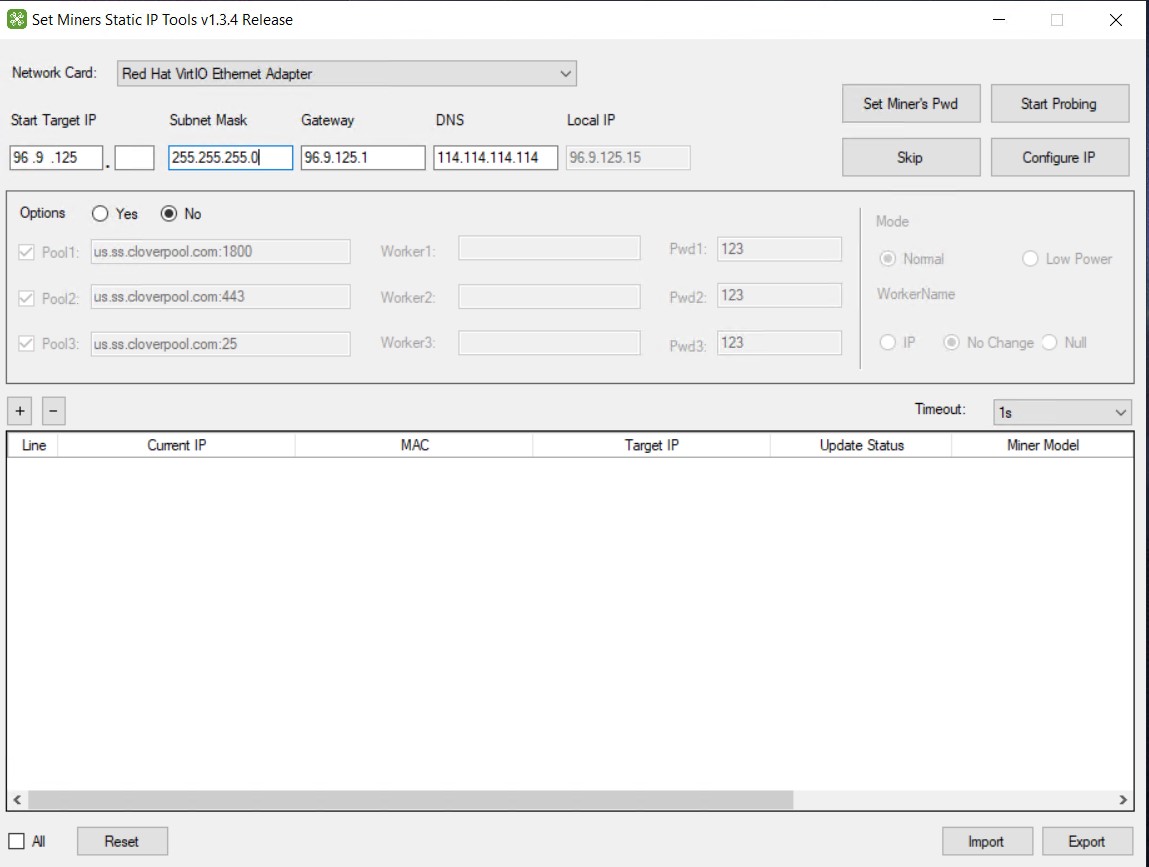
Set Miners Static IP Tools allows you to quickly and conveniently configure a large number of ASIC miners in automatic mode.
Version Set Miners Static IP v1.3.4 is available only for Windows and is distributed as a ZIP archive containing a single executable file: Set.Miners.Static.IP.v1.3.4.exe
How to get started:
- Download the ZIP archive and extract it to any convenient location on your PC.
- Run the .exe file as administrator.
- Configure the network parameters and apply them to your miners.
The software is ready to use.
Why Preparation Matters
Most problems with static IP configuration occur not because of the IP change itself, but because of incorrect network settings.
If you skip the preparation step, you may:
- Assign an IP address from a different subnet
- Set an incorrect gateway or subnet mask
- Create IP address conflicts
- Lose access to the miner’s web interface
- Disrupt monitoring and management systems
Collect Current Network Information
Before making any changes, record the basic parameters of your network:
- Your PC’s IP address
- Subnet mask
- Gateway (usually the router’s IP address)
- DNS (if used)
This information is the foundation for correct miner configuration. If you assign a miner an address that is “outside your network,” it will become inaccessible.
Confirm Miners Are Visible on the Network
Before assigning static IP addresses, make sure that you can see the miners on the network and access their web interface.
The specific method is not important (via router, network scanning, or the miner’s panel). What matters is that you obtain:
- The miner’s current IP address
- Confirmation that it is accessible (the web interface opens)
Create a Static IP Address Plan
Before changing IP addresses in bulk, create a simple addressing scheme.
Recommendations:
- Allocate a separate IP range for miners (for example, .100–.200)
- Do not use the router’s address or reserved system IPs
- Follow a logical structure (by rows or groups)
- Maintain a mapping table: “miner → new IP address”
Example structure:
- Range A — first group of devices
- Range B — second group of devices
The key requirement is that the scheme should be predictable and scalable.
Check for IP Conflicts
Before assigning IP addresses, make sure that the selected addresses:
- Are not already used by other devices
- Are not manually assigned elsewhere
- Are not distributed by DHCP within the same range
Practical approach:
- Use an IP range that is not issued by DHCP
- Or reserve the required range in your router settings in advance
An IP conflict is one of the most common reasons for unstable behavior such as “it works, then it disappears.”
Test on One Miner First
This is a mandatory rule before making bulk changes:
- Select one miner
- Assign the new IP address
- Open the web interface using the new address
- Check connection stability
Only after a successful test should you proceed with other miners.
Apply Settings with Set Miners Static IP Tools
When your network is prepared and the addressing scheme is ready, you can proceed with configuration.
Set Miners Static IP Tools simplifies the process of assigning network parameters to a group of devices:
- You use a pre-prepared IP addressing scheme
- You apply settings sequentially and in a controlled manner
- You reduce the risk of errors compared to manual configuration of each miner
Important: The ability to change settings depends on the miner model, firmware, and access permissions. Always start by testing on a single device.
Next Step
If a miner becomes inaccessible or network errors appear after changing the IP address, go to the Static IP Setup Problems and Fixes page, where common causes and recovery methods are explained.