


Set Miners Static IP Tools – Static IP Tool for ASIC Miners
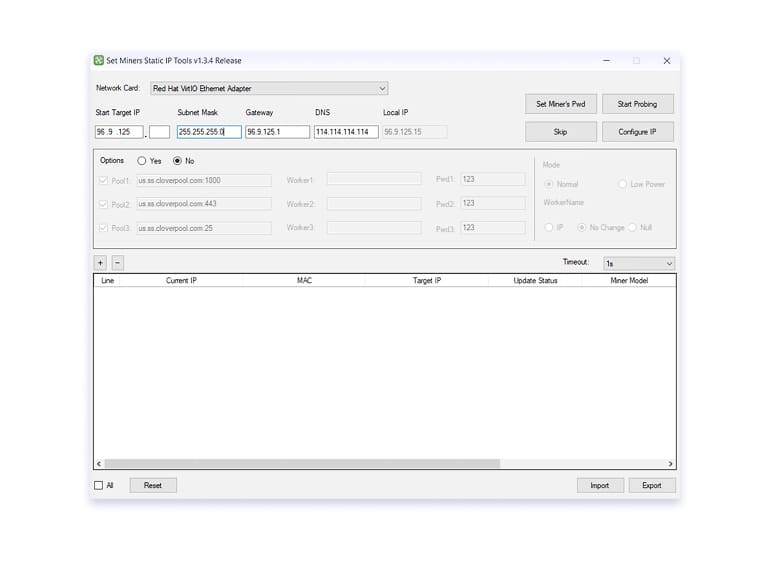
Set Miners Static IP Tools is a Windows application that helps you quickly assign static IP addresses to your ASIC miners.
It also allows you to configure network settings for multiple miners at once, eliminating the need to manually access the web interface of each device.
Set Miners Static IP Tools helps prevent “changing” IP addresses caused by DHCP and simplifies miner management: you define network parameters once and apply them to selected miners.
Important: the ability to change network settings depends on the miner model and firmware. Always test changes on a single miner before applying them in bulk.
What Is Static IP for ASIC Miners
A static IP is an IP address that you assign manually and that does not change after restarting the miner or router. For ASIC miners, this is especially useful because:
- The miner is easier to find on the network.
- It is easier to monitor and manage the mining farm.
- There is less confusion when DHCP changes IP addresses.
If you often face situations like “yesterday the miner was 192.168.0.120, and today it is 192.168.0.34,” static IP addresses help you keep one fixed address for each device.
Change IP Address on ASIC Miners
The search query “change asic miner ip” usually refers to one of the following tasks:
- Switching miners to fixed (static) IP addresses
- Assigning IP addresses in a logical order, so you can easily understand where each miner is physically located
- Restoring order after DHCP-related network chaos
Basic logic for changing an ASIC miner’s IP address:
- Identify your network subnet (for example, 192.168.0.0/24).
- Choose an IP range for your miners (for example, 192.168.0.100–192.168.0.200).
- Make sure the selected addresses are not already used by other devices.
- Apply the changes to one miner first.
- After changing the IP, open the web interface at the new address and confirm that the miner is accessible.
Important: if you set an incorrect gateway, subnet mask, or network range, the miner may become “invisible” from your network. Therefore, make changes carefully and step by step.
Download Static IP Tool for ASIC Miners
If you need a simple and reliable way to assign static IP addresses to your ASIC miners and keep your network organized, download Set Miners Static IP Tools for Windows from the Download page.
Quick start:
- Download Set Miners Static IP Tools for Windows.
- Prepare your IP addressing plan (range, subnet mask, gateway, DNS).
- Add one miner and change its IP address.
- Make sure the web interface is accessible at the new address
- After testing, apply the settings to a group of devices
Note: the software works within a local network environment.
Help & Documentation
Static Miner IP Tools helps you manage and configure IP addresses for ASIC miners.
Step-by-step guides, network setup instructions, and troubleshooting solutions are available on the Static IP Tools Help page.